Styling list bullets like card suits
When I was seven years old (as I recollect. In truth I’m not certain of my age but I was definitely around seven, and besides, that’s the age I always am whenever I remember being a child and not knowing how old I was), I got a magic trick in my Christmas stocking.
The trick is published by Marvin’s Magic, which is a decent place to get something of decent quality for an aspiring young illusionist, and it’s called Dynamic Coins™. The performer starts with a verifiably empty brass cap. But when it’s placed face down on the table, and after an enigmatic incantation is uttered, and an appropriately mysterious gesture is executed, a stack of 10p coins is revealed when the brass cap is lifted.
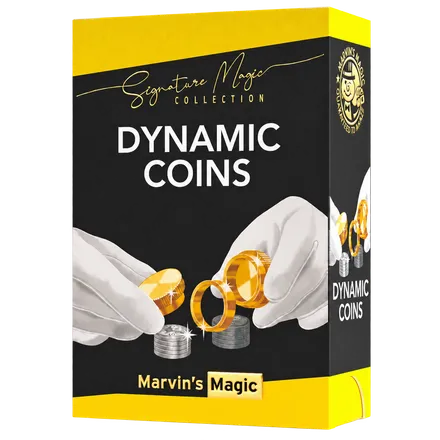
Probably still available at places like Hamley’s or online
Which, as long as the audience doesn’t question why you have a couple of brass caps and a brass ring they’ve never seen you carry around before, is an absolute showstopper.
After some kind indulgences from my parents, my long-suffering older brother, and my French grandparents, who, not speaking any English, did an outstanding job at convincing me I was doing great things, I was hooked. I’d hoodwinked these suckers with something I’d pulled out of an elaborate, yuletide sock only that morning. And they loved it. So began my love of magic.
I quickly graduated to card magic: there’s an abundance of material available to the would-be card manipulator; playing cards are near-universal; and, crucially, for a child who never conceived of the possibility of asking his parents for a bit more pocket money than the paltry amount that wasn’t actually enough to do anything with (I’m actually over it. I’m fine.), playing cards are cheap. To me, they are also beautiful. See, for example: the Wicked Kingdom deck.
Which is why, when reflecting on how to add some personal flourishes to my personal website, it occurred
to me that the markers (bullets) for my unordered lists could be card suits. The symbols for these,
conveniently, are in Unicode, which means I can use ♠ U+2660, ♥ U+2665, ♦ U+2666,
and ♣ U+2663 in CSS very easily.
I thought it would be neat if the list items in my unordered lists (ul elements) looked like this:
- And now,
- as you can well see with your own eyes,
- unless you’re hard of sight
- in which case, my apologies,
- or you happen to currently be…
- borrowing somebody else’s eyes?!
The list markers go in sequence through spades, hearts, diamonds and clubs, and then repeat.
Provided you know of CSS’s immense power, this is relatively simple to achieve using
:nth-of-type(), which became widely
available in 2015.1 (Though back then you’d probably have had to use list-style-image with four image files
or the ::before pseudo-element.2)
Now though, we can use list-style-type and a string.3
ul > li:nth-of-type(4n + 1) {
  list-style-type: '♠︎  ';
}
ul > li:nth-of-type(4n + 2) {
  list-style-type: '♥︎  ';
}
ul > li:nth-of-type(4n + 3) {
  list-style-type: '♦︎  ';
}
ul > li:nth-of-type(4n) {
  list-style-type: '♣︎  ';
}
As is often the case with CSS, this is not the only way to achieve this effect. My first instinct was to
use the ::marker pseudo-element,
but content is not supported in Safari at time of writing.4 So this is not possible cross-browser:
ul > li:nth-of-type(4n + 1)::marker {
  content: '♠︎ ';
}
ul > li:nth-of-type(4n + 2)::marker {
  content: '♥︎ ';
}
ul > li:nth-of-type(4n + 3)::marker {
  content: '♦︎ ';
}
ul > li:nth-of-type(4n)::marker {
  content: '♣︎ ';
}
For the purposes of my website, where I’m in charge of the content and not likely hiding
individual list items, I could stop here. But after going down a rabbit hole researching ::marker (Safari
does support the font-size and color properties, for instance), I discovered that CSS can count.
Let the list do the counting
CSS has a more direct way to describe the pattern: @counter-style.
Each list item, even in an unordered list, already has a number behind the scenes; this rule says how to
display that number. Here is what this site uses:
@counter-style card-suits {
  system: cyclic;
  symbols: '♠︎' '♥︎' '♦︎' '♣︎';
  suffix: ' ';
}

ul {
  list-style-type: card-suits;
}
cyclic means that item five returns to the first: ♠︎. One definition covers every list, however long it is.
This is really nice, and it’s worth checking out the other properties you can define for
@counter-style. Unsurprisingly though,
there is yet a third route that would achieve the same effect, using
symbols().
ul {
  list-style-type: symbols(cyclic '♠︎' '♥︎' '♦︎' '♣︎');
}
The word cyclic is doing real work here. Leave it out and the default is symbolic: after the
four single suits, you’d get ♠︎♠︎, ♥︎♥︎, and so on, which is excellent for footnote symbols, which
conventionally follow this sequence *, †, ‡, §, **, ††, ‡‡.5 If you need to reuse a style,
control its separator, define a fallback, or give a hint about how it should be spoken, you
need the full @counter-style rule. For an anonymous one-off, symbols() will be an option
once browser support catches up. Firefox implemented both in 2014; @counter-style reached Chrome
and Edge in 2021 and Safari in 2023, but symbols() still has limited availability.6
While these features can be used to achieve my particular effect, they aren’t merely longer and shorter ways to achieve the same thing. Understanding how they work, and their subtle differences, unlocks their various use cases, and potential gotchas.
:nth-of-type() counts element siblings in the HTML, including ones hidden with display: none. But a
counter doesn’t advance for an item that isn’t displayed.7 So, if you hide the second item in a five-item
list, then the :nth-of-type() selector will produce ♠︎ ♦︎ ♣︎ ♠︎ (note that the heart is missing), but a cyclic
counter style will still produce the four suits in order: ♠︎ ♥︎ ♦︎ ♣︎.
Imagine you were showing a list of filtered search results. You’d probably want the visible sequence to
close up. For four fixed slots where a hidden slot should retain its place, then the :nth-of-type()
selector is precisely right. The question to ask yourself is what are you counting?
A plainer demonstration of the differences would be to use <ol start="3">.
Using a counter style means starting at ♦︎. But the first <li> is still the first <li>, so :nth-of-type() starts at ♠︎.
There is one annoying catch. This site’s hearts and diamonds are red because I still colour the second
and third <li> markers with :nth-of-type(). If I were to hide an item, the counter style would
advance past it, but my colour rule would not, and I’d end up with a red spade. (Oh, the shame!)
@counter-style chooses the symbol, not a different CSS colour for each symbol. Fine for my static
lists; not a complete solution for a filterable list. There I’d need to keep suit and colour together
in the rendered data, or use coloured image markers, rather than pretend the selector and the counter agree.
Rummaging amongst the guts of CSS specifications
Understanding this to a high degree of accuracy required going to the source. Doing so - i.e. having the knowledge, tenacity, courage and humility to do so - is, I believe, a key trait of what distinguishes a more “senior” developer, and one I’ve observed in the colleagues I’ve emulated over the years. The same trait can also manifest as digging into a library’s source code or reading Github issues, and generally resembles detective work of an incredibly dull nature.
Here’s how to recreate the journey I went on. Start at the MDN page for @counter-style,
follow its “Specifications” link to CSS Counter Styles Level 3,
then read the introduction before the syntax. It says that the built-in styles weren’t enough for
“worldwide typography”. The suits are a toy example of a much bigger problem: representing numbering
systems and conventions that don’t fit 1., a., or •. The spec’s examples include extending
decimal numbering to produce 1) rather than 1., and styles for Chinese and Ethiopic numerals.
It also explains why symbols() exists: a compact style you only intend to use once.8
From there, the 2015 Mozilla introduction
shows what implementers thought was exciting at the time. The earlier drafts
and CSS Working Group issue tracker
show how the ideas evolved; browser compatibility data
and the WebKit ::marker discussion show the gap
between a written specification and the browser in somebody’s hand.
This reveals a route that might be worth keeping in mind when researching unfamiliar CSS features: MDN docs for the doorway → the spec for the why → issues for the arguments → compatibility data for the reality check.
I dedicate this blog post to my seven year old self, who continues to inspire me. He would not have cared to read this.
Notes
-
MDN’s
:nth-of-type()compatibility summary gives July 2015 as its Baseline date. ↩ -
::beforetypically means removing the native marker withlist-style: none. Safari/VoiceOver can then lose list semantics, although non-empty generated content may restore them; Scott O’Hara recommends an explicit<ul role="list">where the list should still be announced. WebAIM notes that screen readers may also read generated content. ↩ -
WebKit bug 204163 tracks support for
contenton::marker. Safari can style a marker’s colour without accepting new marker content. ↩ -
See the counter-styles specification’s
symbols()examples: its default issymbolic, notcyclic. ↩ -
Browser adoption for
@counter-styleand MDN’ssymbols()support note. Support for a feature’s core syntax does not imply support for every descriptor: for example,speak-ashas its own compatibility story. ↩ -
Selectors Level 4 defines
:nth-of-type()in terms of sibling elements; CSS Lists and Counters Level 3 saysdisplay: noneelements cannot increment counters. ↩ -
The specification introduction states the typography motivation; its sections on extending styles, predefined styles, and anonymous styles give the examples and rationale. ↩